Archive for the ‘VMware news’ Category
Dutch VMUG2010 Keynote report
 December 10th, 2010 |
  Author:
 The Dutch VMUG has kicked off! News flashes from the keynote in here!
750 guests, a new record! Exiting things going to happen today, a lot of interesting presentations! Read the rest of this entry »
 Posted in VMware, VMware news |
  Tags: Dutch VMUG, dutch vmug event 2010, dutchvmug, keynote, VMUG, VMUG 2010 |
  Comments Closed
Presenting at the Dutch VMUG 2010!
This year the dutch VMUG event (see www.vmug.nl) is surely going to be a great success. Again! For the first time I’ll be there as a blogger. Even better, last week I had a nice discussion with someone at IBM. They welcomed me to deliver 20-30 minutes of their presentation at the VMUG2010 event!
So be sure to visit the VMUG 2010 event, and especially the 15:50 – 16:50 session “Van Virtualisatie tot Cloud Computing: portfolio en praktijk” because I’ll be presenting there, and it is going to be really interesting too! Read the rest of this entry »
Posted in Storage, VMware, VMware news |
Tags: Dutch VMUG, Dutch VMUG 2010, Dutch VMUG event, linked clones, n-series, presenting, Storage, VDI, VMUG, VMUG 2010, VMUG event, VMUG2010 |
1 Comment »
VMmark 2.0 released, but where is the ViewTile?
VMware’s VMmark (I have also read the name being VMark though?) has been around for a long time. It is software which creates “tiles” of workload on a physical server using several virtual machine workloads. It then adds tiles to the hardware platform, until its resources run out. Now version 2.0 is out!
Posted in VDI and VMware View, VMware, VMware news |
Tags: Resistance is ViewTile, Tile, View Tile, ViewTile, virtual workload, VMmark, VMware, vSphere performance |
Comments Closed
Chad’s World is on air!
If you are a real Wayne’s World fan… We now have: Chad’s World!
I just saw the “trailer” and I thought you should too:
UPDATE: The first episode should be airing december 19.
Posted in Storage, VMware news |
Tags: chads world, EMC, emc symmetrix, emc2, symmetrix, wayne's world |
Comments Closed
PHD Virtual Backup 5.1er – First Impressions
Today I got my hands on the new PHD Virtual Backup Appliance – version 5.1-ER. Following in the footsteps of its XenServer brother, this new version uses a single VBA (versus the previous versions where multiple VBA’s were used). Best of all: ESXi support at last!
Posted in Virtual Backup, VMware, VMware news |
Tags: early release, ESX, ESXi, PHD Virtual, PHD Virtual Backup, PHD Virtual Backup 5.1, PHDvirtual, Virtual Backup, VMware, vSphere |
9 Comments »
Dutch VMUG 2010: Place to be!
This year on December 10th I’ll be visiting the Dutch VMUG day 2010 in Nieuwegein, the Netherlands. My first time as a blogger! I will be visiting this event for the fourth time, and it has been a great event every single year.
 Posted in VMware, VMware news |
Tags: Dutch VMUG, Dutch VMUG 2010, VMUG, VMUG 2010, VMUG2010 |
1 Comment »
Posted in VMware, VMware news |
Tags: Dutch VMUG, Dutch VMUG 2010, VMUG, VMUG 2010, VMUG2010 |
1 Comment »
VMware releases vSphere 4.0 update 2
VMware just released vSphere 4.0 update 2. Not much new stuff, except improvements in Guest Operating Systems improvements:
Guest Operating System Customization Improvements: vCenter Server now supports customization of the following guest operating systems:
- Windows XP Professional SP2 (x64) serviced by Windows Server 2003 SP2
- SLES 11 (x32 and x64)
- SLES 10 SP3 (x32 and x64)
- RHEL 5.5 Server Platform (x32 and x64)
- RHEL 5.4 Server Platform (x32 and x64)
- RHEL 4.8 Server Platform (x32 and 64)
- Debian 5.0 (x32 and x64)
- Debian 5.0 R1 (x32 and x64)
- Debian 5.0 R2 (x32 and x64)
Also a lot of resolved issues; which is always nice to have!
esxtop advanced features
No rocket science here. esxtop has always been there. Yet a lot of people miss out on some of its great features. Hopefully this blogpost will get you interested in looking at esxtop (again?) in detail!
Yesterday I attended a very interesting breakout session about esxtop and its advanced features in vSphere. Old news you might say, but there is SO much you can do with esxtop. For example, you can export data from esxtop and import them in Windows perfmon. And if you did know that, then for example, did you know you can now actually see which physic NIC is being used by a certain VM?
Other neat little features were shown. The best one being that the “swcur” field is actually NOT about the current swapping activity of a VM, but swapping that occured in the past (yes, I too would have called it differently…). How many of you knew that one? Finally, a very interesting field in the storage screen (yes for those who did not know that one, esxtop is not just about CPU, but also memory, storage, and new in vSphere… Interrupts) ). This field is called “DAVG” and this shows the actual latency seen by ESX to your storage (and also KAVG for kernel latency and GAVG for the total latency the guest sees).
There were also a few examples of misbehaving VMs which was very interesting to see. Numbers which seemed not possible, yet explained perfectly. I would like to vote this very last presentation at VMworld 2009 the best technical presentation I witnessed there!
I hope I got you (re)interested in esxtop. I am more of a graphical guy, so I like the performance monitor embedded within the VI client. But some things just aren’t there. So esxtop is definitely worth a(nother) look. If you’re using ESXi, make sure to download the vMA appliance (here) which has resxtop included (which looks a lot like esxtop on ESX).
VMworld 2009: ICE sculpting pictures online!
During the VMworld 2009 party, one of the very amusing attractions was the ice sculpting by the ICE team:

The ICE team at work

The ICE team building their guitar
You can see all the photographs here !
Just for Fun – VMware just got greener
So what do you get when you mix VMware ESX and some dirt, and then a you add a little enthousiasm? Exactly, you get a paludarium.
The word paludarium comes from the word “palus” basically meaning mud, and it is kind of a cross between an aquarium and a terrarium. I have been building my own little world inside this glass box for the past months. Very moist, very green. Being a VMware fan I just had to combine these two hobbies. Why? Well that one is obvious, because you *can*!
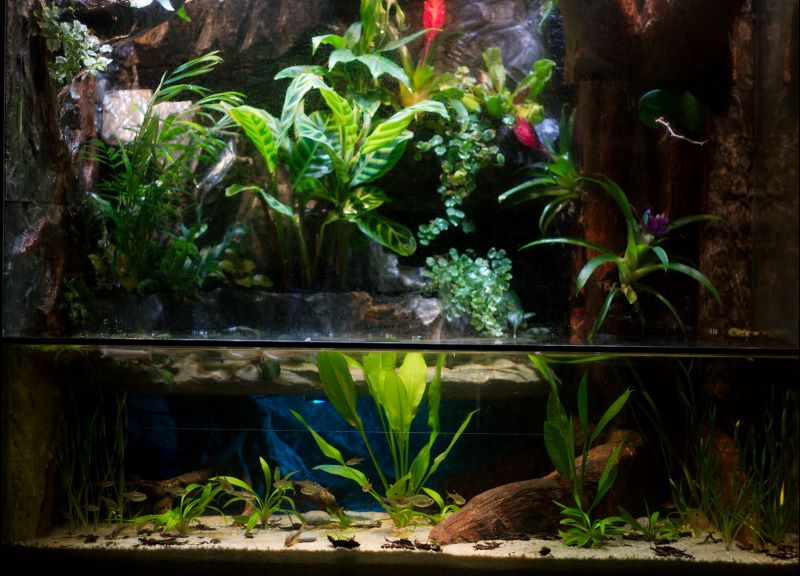
VM controlled paludarium
So now my tiny little jungle is fully controlled by a virtual machine. Lighting, rain, fog, even thunder! Just when everyone thought it wasn’t possible, VMware just got greener!
See my paludarium site at http://paluweb.nl for some live stats!


 LinkedIn
 Twitter